Stop Using a Hammer for Everything: The Right AI for the Right Job
Posted at 7-January-2026 / Written by Rohit Bhatt
30-sec summary
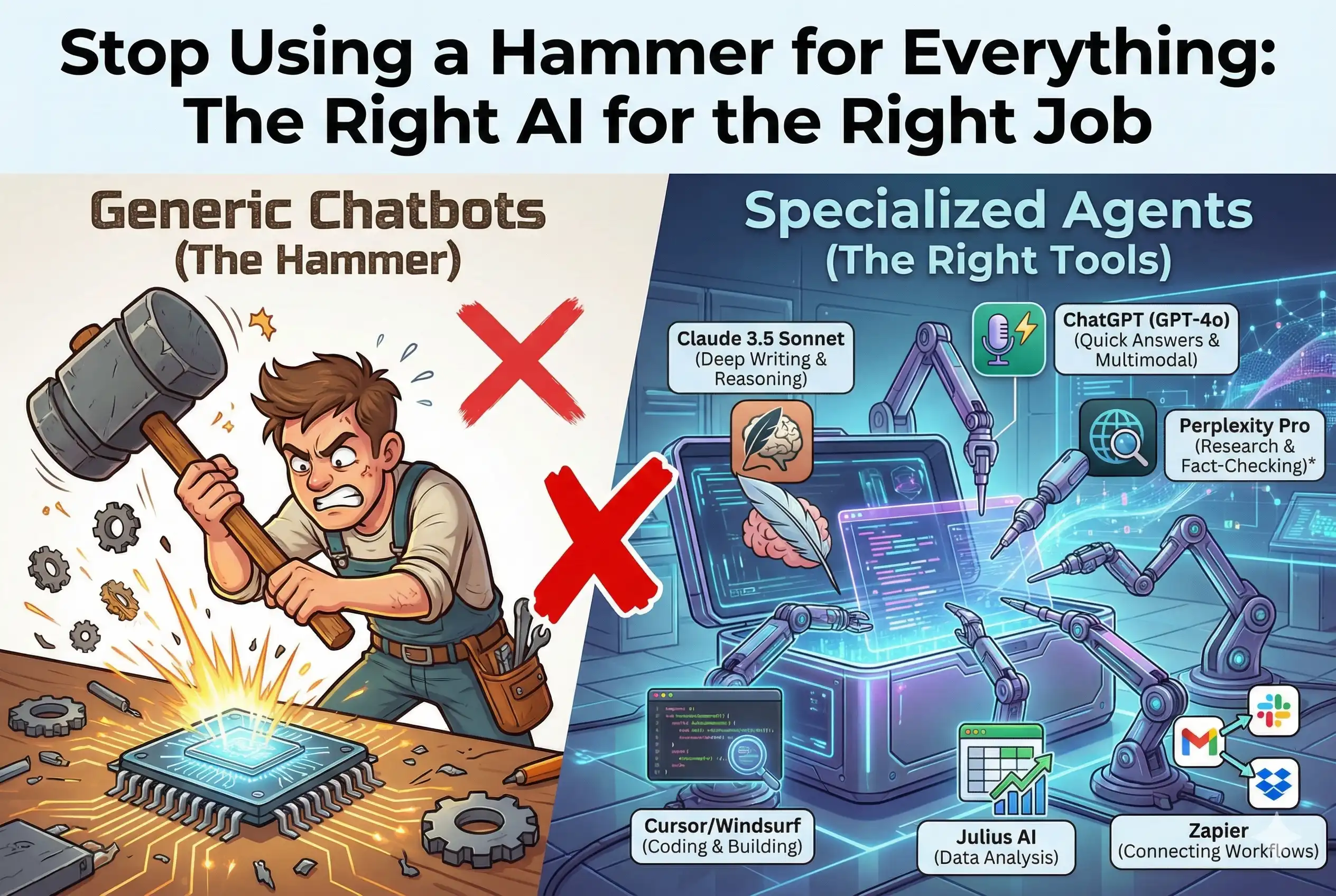
In 2026, relying on a single "do-it-all" chatbot is like trying to build a house using only a Swiss Army knife. Sure, you could do it, but it’s going to be painful. The landscape has shifted from general chatbots to specialized "Agents"—tools designed to handle specific, complex workflows.
Here is a breakdown of which AI tools are actually best for the different hats you wear during the work week.
1. For Deep Writing and Complex Problem Solving
The Task: You need to write a nuanced strategy document, debug a tricky logical problem, or draft an email that needs to hit exactly the right tone.
The Best Tool: Claude 3.5 Sonnet
Why it fits: Think of Claude as that one colleague who actually reads the whole email thread before replying. While other models are built for speed, Claude shines at "reasoning." It is much better at holding onto context over a long conversation and following complex instructions without getting confused.
Real-life example: If you are writing a project proposal and paste in three different messy PDF sources, Claude is less likely to hallucinate and more likely to give you a coherent summary that actually references your specific data.
2. For Quick Answers and "On-the-Go" Tasks
The Task: You need to brainstorm ten catchy headlines, look up a quick fact, or translate a phrase while traveling.
The Best Tool: ChatGPT (GPT-4o)
Why it fits: If Claude is the thoughtful professor, GPT-4o is the whip-smart personal assistant who talks fast and knows a little bit about everything. It is optimized for speed and multimodal interaction (voice, image, text).
Real-life example: You are cooking and need to convert measurements, or you are driving and want to brainstorm ideas out loud. GPT-4o’s voice mode feels natural and has incredibly low latency, making it the king of "chat".
3. For Research and Fact-Checking
The Task: You need to understand a new topic fast, but you don't have time to wade through SEO-spam articles on Google. You need sources you can trust.
The Best Tool: Perplexity Pro
Why it fits: Perplexity isn't a chatbot; it's an "Answer Engine." Instead of making things up, it searches the live internet, reads the top results for you, and synthesizes an answer with footnotes.
Real-life example: You need to know "What are the compliance requirements for AI in the EU?" Perplexity will give you a summarized answer and link directly to the official PDF documents so you can verify the details yourself.
Honorable Mention: NotebookLM
If your research involves reading 50 PDFs you already have on your hard drive, use Google’s NotebookLM. It creates a "Source-Grounded" AI that only answers based on your documents. It can even generate a fake "podcast" of two hosts discussing your notes to help you learn while you commute.
4. For Coding and Building Software
The Task: You are writing code, fixing a bug, or—if you aren't a coder—trying to build a simple web app for a side project.
The Best Tools: Cursor or Windsurf
Why it fits: Coding has moved beyond simple autocomplete. We are now in the era of the "AI Editor."
Cursor is a favorite for developers because it predicts your next move. It doesn't just finish your word; it can suggest entire blocks of code or edit multiple files at once. It feels like the editor is reading your mind.
Windsurf focuses on "Deep Context." It acts like a senior engineer who has memorized your entire codebase. It knows how a change in one file might break something in a completely different folder.
The "Vibe Coding" Phenomenon
For those who aren't professional engineers, tools like Replit and Lovable have popularized "Vibe Coding." This is where you describe the vibe or behavior of the app you want in plain English ("Make a retro-style dashboard that tracks my crypto portfolio"), and the AI writes the actual code. It allows you to focus on the idea rather than the syntax.
Pro Tip
If you use AI for coding, be careful of "Slopsquatting." This is a security risk where AI suggests a software package that doesn't exist, and hackers register that name to trick you into installing malware. Always double-check the libraries the AI suggests.
5. For Data Analysis and Spreadsheets
The Task: You have a massive Excel file with 10,000 rows of sales data, and you need to find trends without writing complex formulas.
The Best Tool: Julius AI
Why it fits: Julius is essentially a data scientist in a box. You can upload a spreadsheet, and instead of struggling with pivot tables, you just ask, "Show me a chart of sales growth by region." Julius writes the Python code to analyze the data, runs it, and gives you a visual chart.
Real-life example: You have a messy customer list. You can ask Julius to "clean up the formatting and tell me which city has the most repeat buyers," and it handles the grunt work instantly.
6. For Connecting It All Together
The Task: You want to automate the boring stuff—like taking a lead from a Facebook ad, putting it into a spreadsheet, and sending a Slack message to your team.
The Best Tool: Zapier
Why it fits: Zapier is the glue of the internet. While other AI tools generate content, Zapier moves data. With its new AI features, you can describe a workflow ("When I get an email with an invoice, save it to Dropbox and alert me"), and it will build the automation for you.
Real-life example: Instead of manually copying and pasting data between apps, you set up a "Zap" once, and it runs in the background forever.
The Future is Agentic
Now that you know which AI tool fits each task, you might be wondering: what happens when these tools stop waiting for your prompts and start acting on their own? We are moving from the era of Chatbots to the era of Agents. If you want to understand how this shift will redefine the entire landscape of technology in 2026, you need to see the bigger picture.